|
 |
|
OmniOutliner Notes
|
|
|
|
|
Initial Impressions
|
|
|
 |
|
Installed and ran trial version of software successfully on OS X 10.10.1
|
|
|
|
|
Opened all of the predefined templates at least once to observe them
|
|
|
|
|
Started creating a simple outline using the Solarized with Level Styles template
|
|
|
|
|
Dragged and dropped a .jpg image from Finder into the outline
|
|
|
|
|
Bullet to the left of the image appeared near the bottom left corner of image rather than the left upper corner.
|
|
|
|
|
This may be intentional, but I found this inconsistent with the way all other multi-line items work.
|
|
|
|
|
Reproduced behavior using blank and compact templates. It seems universal.
|
|
|
|
|
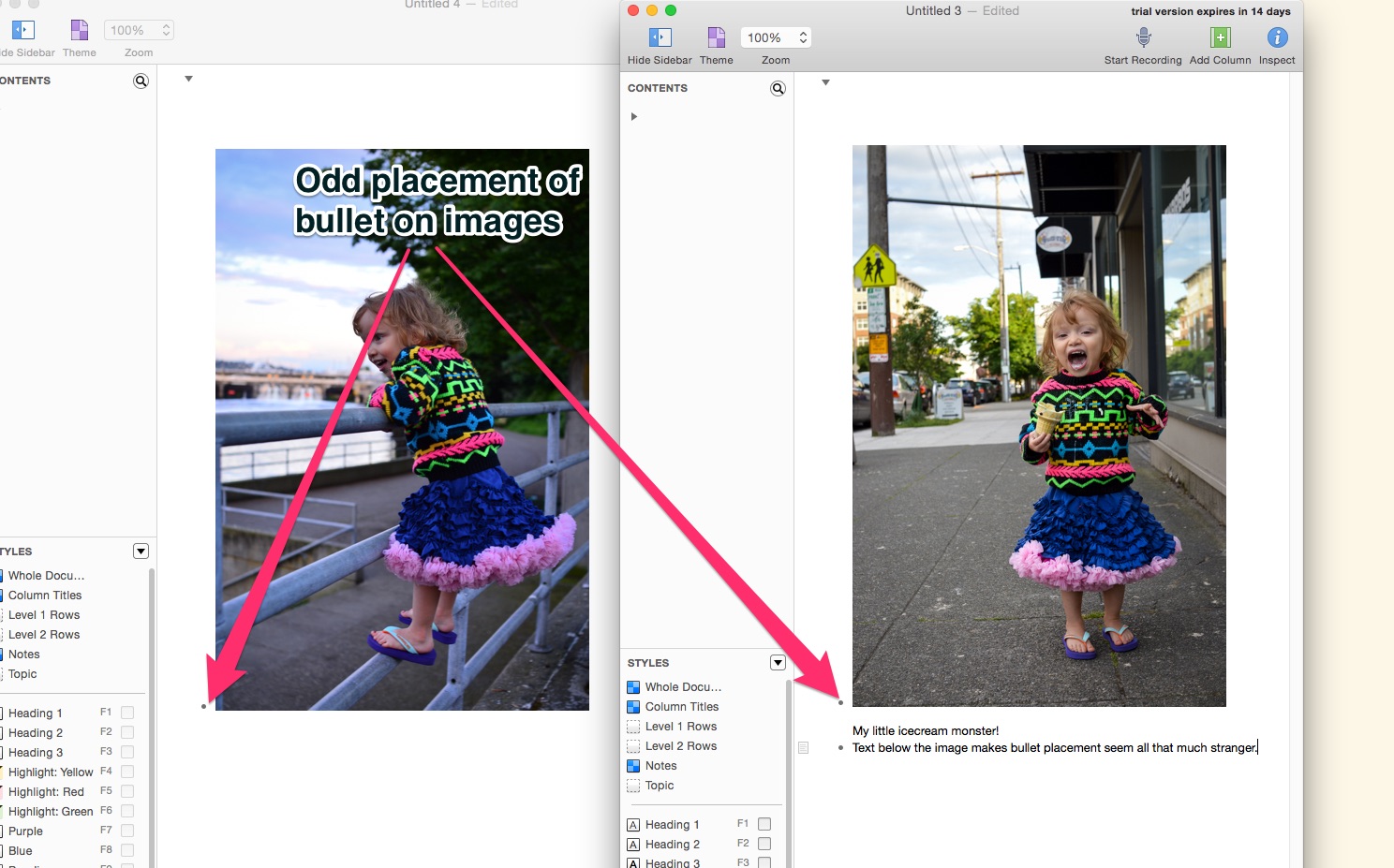
You can see it in action here too if you’re viewing this in OmniOutliner.
|
|
|
|
|
Had some trouble inserting line breaks without creating a new list item. I was using Shift + Return which is typically how they are created in web forms where Return is a shortcut to submit (i.e. Facebook). Shift + Return inserts a new list item previous to the one that is selected. This use of the Shift modifier is consistent with another popular use: Shift + Tab which reverses indentation or goes back to the previous field on a web form. I’m not sure which use is preferable to most people, but it did violate a tiny expectation of mine (Thanks Facebook!). After exploring the application preferences, I discovered Option + Return is the default way to insert line breaks.
|
|
|
|
|
Dragged and dropped a number of other files from Finder into the outline
|
|
|
|
|
.txt document
|
|
|
|
|
.ics calendar file
|
|
|
|
|
.png image
|
|
|
|
|
.mp3 audio file
|
|
|
|
|
.pptx Powerpoint presentation
|
|
|
|
|
.xlsx Excel document
|
|
|
|
|
.mov movie file
|
|
|
|
|
.mp4 movie file
|
|
|
|
|
It appears from this small sample that OmniOutliner has embedded support for image and audio files. Anything other than those file types generated a link to the file that was dragged there. I’m curious to see how it handles this when I get to exporting to various formats.
|
|
|
|
|
I found it interesting that there is embedded playback support for audio but not video. I assume there may be good reasons for this, but after seeing the audio playback bar show up in the outline I assumed I might get similar behavior for video as well.
|
|
|
|
|
Remove Link in right click menu doesn’t work
|
|
|
|
|
When you type a string in the format of a URL it is smartly turned into a hyperlink. But if you right click and choose ‘Remove Link’ it removes the link but retains the link formatting. When you click somewhere else in the outline, the string becomes a link again.
|
|
|
|
|
To remove the link I had to right click > Edit Link > Remove Link.
|
|
|
|
|
Saved and closed documents for later exploration.
|
|
|
|
|
Exporting
|
|
|
|
|
Because of time constraint I focused on formats that I would likely export to
|
|
|
|
|
HTML
|
|
|
|
|
After reading up on the difference between dynamic and non-dynamic HTML exports I will not distinguish between the two as the only difference is Javascript collapsible tables & rows.
|
|
|
|
|
Large images are not resized accordingly
|
|
|
|
|
My large test image (2000 x 1330) was not resized
|
|
|
|
|
As a result it expanded the table cell to take up the full width of my viewport which will certainly be confusing to a user who has been viewing the resized version in the application. It also pushes its bullet point out of place.
|
|
|
|
|
Possible solution is to specify the width & height of the image in the <img> element on export, or to use img { max-height: 100%; max-width: 100%; } in the CSS style to at least preserve the layout of the outline when large images are included.
|
|
|
|
|
Embedded videos are not viewable
|
|
|
|
|
List items that include a link to a video are treated as an embedded object in the HTML with (I’m assuming) the height in pixels of what OmniOutliner used to show the file name and icon. In my case it was 16px. This results in the videos being shown as a sliver of an image on the exported page as shown in my screen grab below.
|
|
|
|
|
A possible solution is to embed videos using the HTML 5 <video> element since all modern browsers implement it.
|
|
|
|
|
Audio is linked in an anchor <a> element
|
|
|
|
|
I find this interesting because it’s the opposite behavior of the application where audio is embedded and videos are presented as a link. Again, it might be useful here to use an <audio> element since all modern browsers support it (at least in mp3 format).
|
|
|
|
|
I noticed the word Topic at the top of the HTML exported document and wasn’t sure where it came from. A quick look at the HTML element revealed a CSS class of columnheader but I couldn’t find where in OmniOutliner to change my column header until I clicked View > Column Headers > Show at which point I was able to delete it altogether. I’m not sure why there is a default column header name, maybe it’d be better to initialize it to an empty string? Of course, there’s probably a good reason I’m unaware of. It just caused me a bit of confusion on the HTML export.
|
|
|
|
|
Links to test outline & modified outline
|
|
|
|
|
Keynote
|
|
|
|
|
Incompatible with Keynote version greater than ‘09
|
|
|
|
|
I was prompted to save the file first in Keynote ’09 which I do not have installed.
|
|
|
|
|
Maybe consider changing the export name to Keynote ’09 to be more specific
|
|
|
|
|
Microsoft Word (Indented & Outline)
|
|
|
|
|
File links, large images and embedded audio do not export at all
|
|
|
|
|
I’m assuming this is probably just a limitation of Word
|
|
|
|
|
Background colors translate to highlighting
|
|
|
|
|
Which doesn’t have the same effect
|
|
|
|
|
Bullet styles don’t export
|
|
|
|
|
Overall, I found the Word export nearly unusable unless the outline was basic indentation and text.
|
|
|
|
|
RTFD (Rich Text Format with Attachments)
|
|
|
|
|
I actually found this to be one of the most usable exports if I wanted to keep it modifiable. The background color doesn’t translate to the whole document but that’s likely just a limitation of the format.
|
|
|
|
|
The End!
|
|
|
|
|
This is about all I had time for. Hopefully this gives you an idea of how I look at a piece of software and some of its details.
|
|
|